Fingerprint identification
Search and verify enrolled fingerprints, then review candidate matches and supporting records.

Sentinel ID
Connect fingerprints, faces, vehicles, cameras and field officers in one controlled workspace. Follow the record from the first report to the investigation and the response.

At the checkpoint, in the control room and beside the investigator, the same need comes up: bring the right information to the person who can act on it.
Explore the full workflow, from identity enrolment to a case, a camera event or an officer requesting help.
Search and verify enrolled fingerprints, then review candidate matches and supporting records.
Review candidate matches from photos, camera images and uploaded video with an authorised operator.
Connect plate reads, vehicle records, documents, flags and sightings.
Follow recorded events by time and location, with source records for investigation.
Review flagged people, vehicles and configured site events in the control room.
Assign a nearby or specific officer, follow acceptance and call back after a dropped call.
Record statements, assign work, attach evidence and track the investigation.
Use role permissions, approval workflows and activity records to control sensitive actions.
Work with uploaded media and review recognised candidates alongside the source material.
Request field camera sharing with the officer’s permission.
Approve field devices and camera connections, and revoke access when needed.
Plan the installation on infrastructure controlled by the organisation.
Keep multiple phone numbers, changes and recorded reassignment over time.
Store bank accounts and use configurable Bank ID and TAX ID field names.
Group cameras by guarded site and configure detection rules and alert recipients.
Connect authorised partner events and share information within configured permissions.
Bring together identity records, linked cases, sightings and partner events. Analytical results support an investigator’s judgement and must be checked against the underlying evidence.
Use supported record queries to find relevant information and follow the source records.
Review recorded flags, associated cases and related events in context.
Explore incident patterns and location trends to support patrol planning.
Review configured alerts and emerging patterns before deciding on the next action.
Compare enrolled fingerprints, faces, plates and supported audio or video inputs.
Investigate conflicting identity information, suspicious activity and access concerns.
Keep fingerprints, faces, identifiers, bank accounts, vehicles and cases connected to the person profile.

Connect vehicle records, plate reads, document checks and watchlist alerts. Review where and when a vehicle was seen, then coordinate a response.
Partner licensing, insurance and travel data require an actual authorised connection.
Explore the vehicle lookout scenario
Plan coverage around the location: a road, a shop, a perimeter or an officer in the field. These illustrations show common hardware types; each selected device and connection must be validated during deployment.

A focused view of gates, driveways and perimeter approaches.
Discreet coverage for indoor corridors, reception areas and shops.
Pan, tilt and zoom hardware for a wider monitored area. Control depends on the device integration.
Roadside capture planned around plate size, shutter speed, lighting and lane position.
An option for remote sites. Size the battery, panel and data plan for the actual workload.
Field footage for review or evidence upload through the agreed device workflow.
An approved camera or gateway uploads images using its dedicated connection details and revocable key.
Use a supported image or stream source where the network and camera allow the server to retrieve it.
Approve each source before connection. Plan power, connectivity, retention and access for the site.
Camera types shown for reference. Compatibility depends on the selected device and connection method. Solar runtime and mobile data usage depend on the site and capture workload.

A site camera supplies an image of a person crossing a closed perimeter.
A configured rule raises an event. Control checks the image, location and context.
Dispatch selects a nearby or specific officer and sends the location and instructions.
Attach relevant captures to the case and record the response for later review.
A detection is a lead for review. An image or automated match alone does not establish that a crime occurred.
Explore camera response scenariosGroup cameras for a mine, a plant, an estate or an event. Configure supported detection categories, rules and recipients around the actual site requirements.

A small floating notification stays available until control acknowledges the SOS. New alerts make a sound, and the location opens on a map.
Dispatch can select a nearby or specific officer, follow acceptance and call an officer back after a dropped call.
Follow the SOS scenario
The Android field app supports phones and tablets for people and plate checks, complaints, photos, GPS, dispatch and communication.

Three illustrative workflows: a roadside check, a patrol vehicle and an emergency response. Names, places, plates and outcomes are fictional.

The officer photographs the plate or types the licence number in the field app. The screen shows the owner, the papers and any warning, from the same records the control room uses.
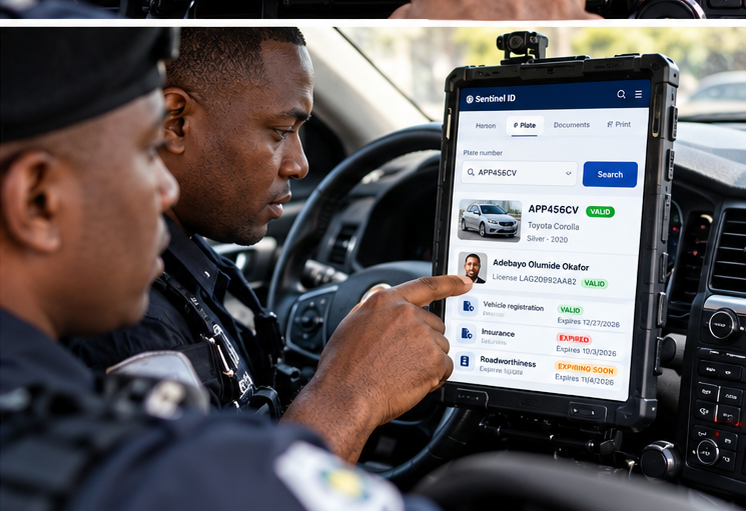
Officers check any plate from the car, by typing it or reading it with the camera. If the vehicle is stolen or wanted, the tablet shows the recorded flag and an alert goes to headquarters.

The dispatch arrives on the screen in the car with the place, the distance and the instructions. One tap accepts it and opens directions, and headquarters sees the officer on the way.
Example scenarios: roadside checks, patrol enquiries and emergency dispatch.
Illustrative examples explain how records, cameras and officers work together. They are demonstration scenarios, rather than reports of actual deployments or arrests.
Size record storage, camera traffic, processing and backups for your intended deployment. Test representative workloads and restore procedures before production.
Manage permissions, profile password changes and authenticator-app OTP. Web accounts have a two-week activation policy; the mobile app follows its device access controls.
External audit archives, quality checks, attestation and identity verifiers remain disabled until configured with the appropriate services.
Choose hosting, networking, retention and support arrangements for the organisation. Review the technical scope and pricing before a pilot.
Explore identity, cameras, cases and emergency response in a guided demonstration.
Web access can require the Sentinel access client on an approved device. The server checks the installation before allowing a connection, including for privileged accounts.
View the controlsStaff and authorised partner systems connect through a secure public gateway. It carries pages, API requests, file transfers and live communications.
View the controlsEach account has one active login. Signing in on another device signs out the earlier session. Password and security changes also end earlier sessions.
View the controlsEvery officer belongs to a unit or station. Approval permissions can limit case reviewers to their own unit or agency. Self-approval follows the organisation’s policy.
View the controlsEvidence records include checks for file changes and a history of who handled each item. Digital signatures and legal holds are available when set up for the organisation.
View the controlsActivity records help administrators review actions and investigate unusual use. Integrity checks help identify changes to the audit trail. An external archive can be connected where required.
View the controlsUpdated 26 October 2026. Features depend on policy and configuration.
Register coverage, preview selected cameras, review detections and coordinate the response.
Explore Site securityExtend existing datasets, continue training and review independent results before activation.
Explore AI trainingThe national identity and investigation product. Recognition results are candidates for human review. External identity, border and partner checks require an authorised configured integration.
Capabilities, practical examples and deployment requirements for this product.
Review the implemented capabilities and their operating conditions.
Explore features →Follow illustrative workflows and the records needed for review.
Explore use cases →Understand supported connections and the work needed to commission them.
Explore integrations →Review access boundaries and operational responsibilities.
Explore security →Plan a pilot, acceptance tests, training and support.
Explore deployment →Read the full proposal and use the editable presentation.
Explore proposal & slides →